PRO
Change cameras, follow a driver and replay what happened while watching a race: timing, map and events on one screen. A PRO plan tool of Raptor Racing Overlay.
 123456789
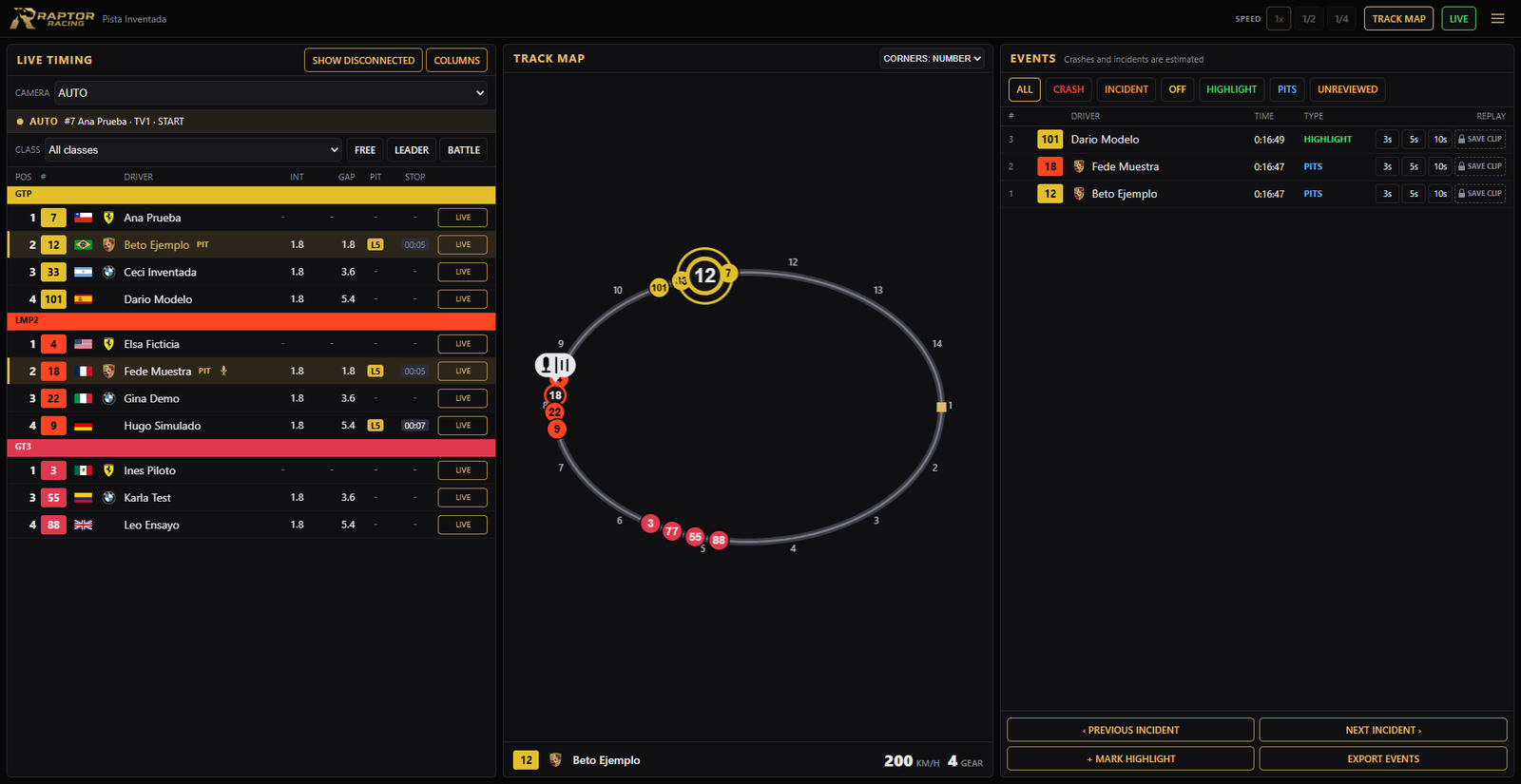
The Raptor Director page, with a made-up race and drivers.
- 1CAMERA: AUTO, which picks the shots itself, or any you want.
- 2COLUMNS: add or remove table data.
- 3SHOW DISCONNECTED: those with no live data. They come hidden.
- 4The map: the track with each car, its color and number, and a microphone on whoever is talking.
- 5CORNERS: number, name or none.
- 63s, 5s and 10s: replays the event from that many seconds before. When it ends, it goes back to LIVE.
- 7SAVE CLIP: records only that event as a video.
- 8SPEED: normal, half or a quarter. Only in a replay.
- 9LIVE: goes back to what is happening now.
Where it works
- Watching a race as a spectator or in an iRacing replay.
- If you are driving or in the garage, the page shows RACE DIRECTOR LOCKED.
- It only moves cameras and replays: the picture shows in iRacing.
How to open it
- In the menu, TOOLS group: RAPTOR DIRECTOR, and turn it on. It is part of the PRO plan.
- On this computer, click OPEN HERE. On a phone or tablet, scan the QR code.
- In iRacing, join to watch the race or open a replay.
LIVE TIMING
- CLASS
- Shows all of them or just one.
- FREE, LEADER and BATTLE
- Who the camera follows: your pick, the leader or the closest fight.
- YOUR CAR
- Goes back to your car.
- Green and red
- Green gains a position, red loses one.
- Gold row
- It is in the pits. PIT and STOP show the lap and the time.
- TIRES
- In COLUMNS: each driver's last 1, 2 or 3 sets.
The map
- TRACK MAP
- Shows it on the screen or takes it off.
- The flag
- Below the map: the country of the driver being shown.
EVENTS
- The logo
- Each event shows the car logo, just like the table.
- The filters
- ALL, CRASH, INCIDENT, OFF, HIGHLIGHT, PITS and UNREVIEWED. Crashes and incidents are estimated.
- PREVIOUS and NEXT INCIDENT
- Jumps between the incidents of the replay.
- MARK HIGHLIGHT
- Notes what you are watching.
- EXPORT EVENTS
- Saves the list to a file.
While you watch a replay
- What happens live is not lost: it stays on the iRacing tape.
- When you return, the UNREVIEWED STRETCH row appears with its times. VIEW takes you there and logs its events.
- REVIEW ALL goes through every stretch, quickly. The iRacing picture moves while it reviews: use it after you finish streaming.
SAVE CLIP
- It needs iRacing video capture. If it is off, the button shows a padlock.
- To turn it on: 1. Close iRacing. 2. Open Documents, iRacing, and the app.ini file with Notepad. 3. Find vidCaptureEnable=0 and change the 0 to a 1. 4. Save and open iRacing.
- It goes to 5 seconds before the event and records 10 seconds.
- The video is saved in Documents, iRacing, videos.
- VIEW SAVED CLIPS: opens that folder.