How much to refuel, how much you have spare and when to pit, from the real usage of every lap. PRO plan. It only reads iRacing data: it never touches your car or your pit stop.
The screen
12345678
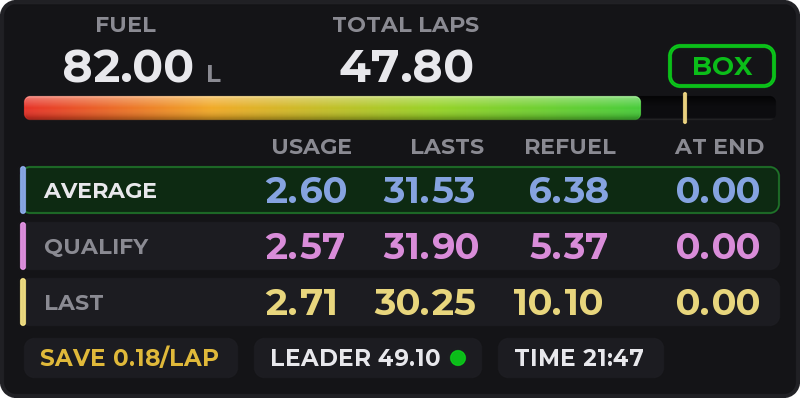
Example: 100 L tank, 33.80 laps to go, average of 2.60 L per lap.
1FUEL: the fuel you have now, live.
2TOTAL LAPS: the laps you will drive in the race. See Total laps.
3BOX: whether it's time to pit. See The BOX indicator.
4The bar: the tank, from red (empty) to green (full).
5The gold mark: what you need to reach the end. If the bar goes past it, you make it without stopping.
6The columns: USAGE, LASTS, REFUEL and AT END.
7The rows: one usage per row. AVERAGE, in green, is the one that rules.
8The footer: SAVE (how much less to burn per lap to finish without stopping), LEADER (the leader's laps if he's in another class) and TIME.
The rows
AVERAGEFrom your last 5 clean laps, the middle 3 (without the highest and the lowest usage). With no laps today, it uses the ones saved for that car on that track.
QUALIFYWhat your fastest qualifying lap used.
LASTThe last lap, as it was.
CUSTOMYour own value. Tap another row's USAGE to copy it, and adjust it with ▲▼ by 0.01; hold them down and they speed up. Off by default.
Laps with a pit entry or exit, a tow or refueling don't count. Safety car laps and laps 10% slower only count as LAST.
The columns
USAGE · L per lap
The row's usage.
LASTS · laps
How many laps the tank lasts.
REFUEL · L
How much to add to reach the end, with 0.5 L (0.2 gal) of margin. 0.00: you make it without refueling.
AT END · L
What's left at the flag if you don't stop. 0.00: it's not enough.
The math in the picture (AVERAGE row)
LASTS = 82.00 ÷ 2.60 = 31.53 laps
REFUEL = 33.80 × 2.60 − 82.00 + 0.50 = 6.38 L
AT END = 82.00 − 33.80 × 2.60 (not enough) = 0.00 L
REFUEL is rounded up; LASTS and AT END, down: the error falls on the safe side. Tapping AT END switches to AT END −1L or +1L: REFUEL and AT END are worked out with one lap less or one more.
Total laps: when your race ends
In iRacing the race ends when the overall leader takes the checkered flag; from then on everyone finishes the lap they're on. That's why your laps depend on the leader.
The number is the lap, counted in your laps, you'll be on when the leader takes the flag. Rounded up, it's the laps you will drive.
The decimal tells how close you are to one more lap: 27.90 is about to become 29; 27.20 isn't.
In a lap race it's the race total, or less if the leader is going to lap you: 24.25 in a 26-lap race means you drive 25.
With right click > Laps in race > REMAINING you only see what's left: time left divided by your pace.
A real example: 45 minutes, 1:40 laps
The clock hits 0:00 with you on lap 26.33.
The leader, about to lap you, takes the flag 83 s later.
The calculator shows 27.16: you drive 28 laps, not 26 or 27.
The BOX indicator
BOXNothing to do yet, or you make it to the end.
BOXThe window is open: if you stop now, with a full tank you reach the end.
BOX2 laps of fuel left, or less.
BOX1 lap left, or less: pit this lap.
BOXBlinking on the starting grid: what you loaded isn't enough.
It's worked out with the AVERAGE.
When the numbers change
The rows are recalculated when you cross the line, and in the pit box while you refuel: REFUEL drops to 0.00 as the fuel goes in.
FUEL, the bar, BOX and LEADER change live.
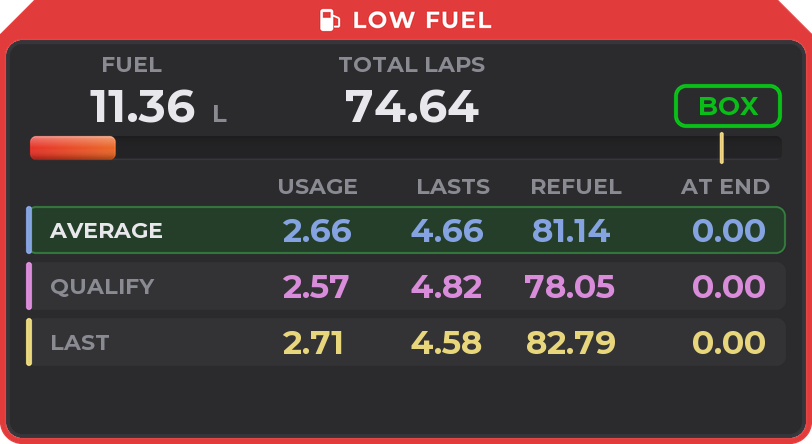
Low fuel warning
For when you forget to refuel after qualifying. It comes turned off: turn it on in the settings, WHAT SHOWS tab > LOW FUEL WARNING (where you also pick the limit and the side of the strip), or with right-click > Low fuel warning.
It only shows up before a race start, if you have less than the limit (10, 15, 20 or 30 L; 20 L by default) and less than 25% of what the series lets you fuel.
Examples: a GT3 warns below 20 L, an MX-5 (45 L) below 11 L and an F4 (40 L) below 10 L.
A red ring pulses around the calculator with LOW FUEL. It goes off when you fuel above the limit, and it doesn't come back after the start.
The warning, before the start.
Basic view
In the settings (THE MATH > VIEW) or with right click > View you choose PRO, the default, or BASIC.
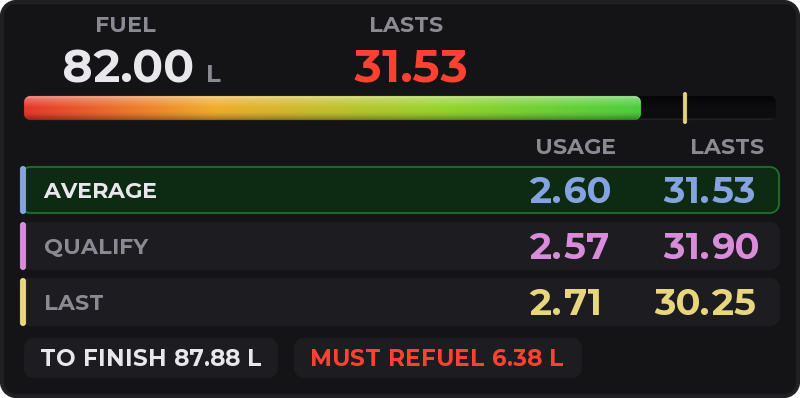
BASIC shows FUEL, how many laps it LASTS (green: spare; amber: tight; red: you must refuel), each row's USAGE and LASTS, and at the bottom TO FINISH and SPARE or MUST REFUEL.
The basic view with the same numbers: not enough, refuel 6.38 L.
Controls
On the overlay: tap a row's USAGE to copy it to CUSTOM, use its ▲▼ arrows and tap AT END to change the mode.
Keys or wheel buttons to raise, lower and change the mode: in the settings.
Right click: view, rows, laps, warning, units, size and more. Everything, in the settings of the Raptor Racing Overlay menu.

 1
2
3
4
5
6
7
8
1
2
3
4
5
6
7
8